AI Insurance & Document Checker for Co-ops and Condos
Contractor COIs, resident insurance — checked in seconds.
COIs and resident insurance are one of the most tedious things a board or managing agent handles. Let AI do the first pass so a human only reviews what actually matters.
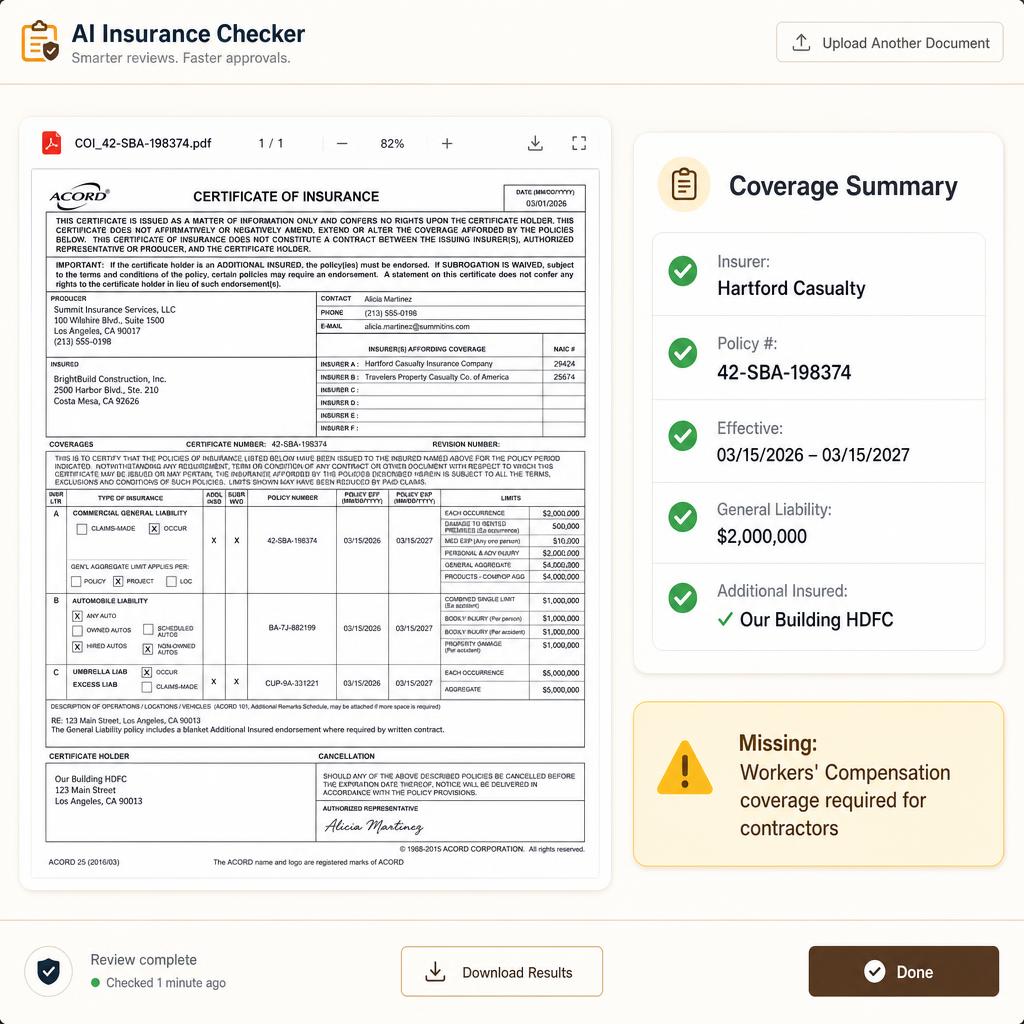
See exactly how a policy gets reviewed
This is the review screen itself: the document on the left, your building's requirements on the right. Click a requirement and the policy jumps to the line that answers it. Mark items, then approve, skip, or send it back — rejecting drafts the note to the resident from what you marked.
A sample policy for demonstration. In the app, the document is the real file the resident or staff uploaded.
What happens, step by step
- Step 1It gets filed
A resident uploads a PDF or photo, or staff drop in a whole folder at once. The AI reads each file, works out whose policy it is and when it expires, and puts it in the queue.
- Step 2The AI reads it against your checklist
It opens the declarations page and pulls the carrier, policy number, limits and dates. For every requirement on your list it records what it found, which page, and the exact line of policy language.
- Step 3You walk the list, one item at a time
Click a requirement and the document jumps to that page and highlights the wording that answers it. Each item is marked met, a problem, or not shown — with the quoted language behind the call.
- Step 4You decide: approve, skip, or send it back
Mark any item “Looks right” or “Problem”, then Approve, Skip, or Reject. Rejecting writes the resident's note for you — what's missing, what the policy shows, what to ask the carrier for. Edit it before it goes.
- Step 5Renewals stop being a surprise
Approved policies read as current. Anything expiring inside 30 days surfaces in the queue, and the All residents list shows every apartment — current, expired, needs review, missing.
The checklist is yours, not ours
Every requirement is your building's own wording — liability minimums, loss of use, additional insured language, water backup, roof rules. Change them in Change requirements and the next scan uses the new list. Nothing is hardcoded to one carrier or one policy format.
- · Personal liability of at least $300,000
- · Loss of use at least 20% of dwelling coverage
- · Water damage backup covered
- · Your building named as additional insured
Add a line and the AI starts checking it on the next document. Remove one and it stops.
Expired policies don't spend AI credits
A policy that has already run out is flagged first, not scanned by default — there's no point reading an old document in detail. If you want it looked at, one click scans it and drafts the renewal note, listing where the previous coverage fell short of your requirements.
Current documents are different: open one and the check runs automatically, so every requirement is already pointing at its line in the policy.
How it works for your building
Contractor COIs, resident HO-6 policies, rider forms — no format wrangling.
Expired policies, coverage below the building's requirement, and anything expiring in the next 30 days — surfaced clearly.
Carrier, policy number, effective and expiration dates, liability and property limits, broker contact.
Renewals become obvious. No more spreadsheet.
Ready to try it in your building?
One plan. $79/month for buildings under 100 units. Plus a one-time $299 setup.